KotenOCR reads the text in a photo of a classical Japanese book (kuzushiji) or a modern Japanese document. Recognition runs entirely on your device. Your photos never leave it.
What we’re asking
To publish an app on Google Play, at least 12 people need to stay in its test for 14 days in a row. All you need to do is install the app and keep it for 14 days. You don’t need to use it every day.
You will need:
- An Android device (Android 8.0 or later)
- The Google account you use on that device
Join the test
-
Open our Google Group, KotenOCR Android Testers, and click “Join group”. Use the Google account you use on your Android device. When a confirmation dialog appears, click “Join group” again.

-
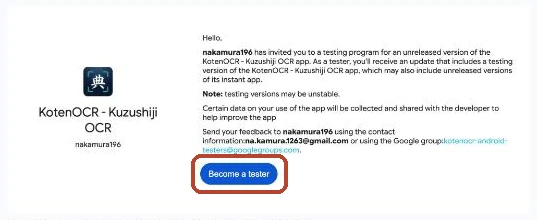
Open the Google Play test sign-up page and tap “Become a tester”. If you open it before joining the group, it says “App not available”. In that case, start from step 1.
-
Open KotenOCR on Google Play and tap “Install”. It may take a few minutes after becoming a tester before the app is available.
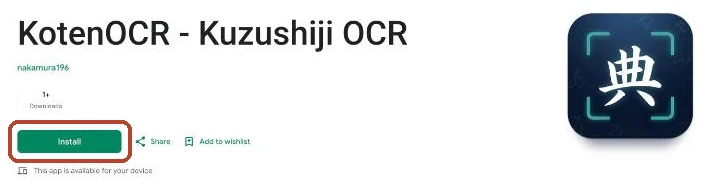
These screenshots were taken in a desktop browser. The same buttons appear on an Android device.
When you join, the email address of your Google account is visible to the group manager (the developer). Other members cannot see it. Only the manager can post to the group, so you won’t normally receive email from it. To leave, tap “Leave the program” on the test sign-up page and leave the group.
Thank you so much for your help! Please send bug reports or suggestions from the app’s Google Play page, or via GitHub Issues.
Links
- Home (features and how recognition works)
- Privacy policy